To prevent clutter on your gaming desk, start by reassessing the layout of your setup and evaluating the necessity of each item. By streamlining your desk space and focusing on functionality, you can create a more efficient and organized gaming area. But remember, there’s a crucial aspect that many overlook when tackling desk clutter, and it involves a simple yet effective tactic that can transform the look and feel of your gaming station. Keep reading to uncover this game-changing strategy that will revolutionize your gaming experience.
Decluttering Your Gaming Setup
To declutter your gaming setup, prioritize functionality over aesthetics. Begin by assessing the essential components needed for your gaming experience. Remove any peripherals or accessories that you rarely use or that don’t serve a practical purpose. Keep only the items that contribute directly to your gaming performance or comfort.
Next, optimize your desk space by organizing your equipment based on frequency of use. Place frequently used items within easy reach, while storing less used items in designated storage areas. This won’t only declutter your desk but also improve your efficiency during gaming sessions.
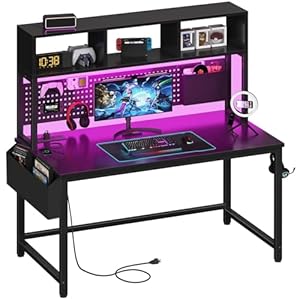
Consider investing in multi-functional furniture pieces that can help maximize space utilization. Desks with built-in cable management systems or storage compartments can significantly reduce clutter. Additionally, wall-mounted shelves or monitor stands can free up valuable desk space for a cleaner and more organized setup.
Remember to regularly declutter and reevaluate your gaming setup to ensure it remains functional and efficient. By prioritizing functionality over aesthetics, you can create a streamlined and clutter-free gaming environment that enhances your overall gaming experience.
Implementing Cable Management Solutions
Consider incorporating cable management solutions to effectively organize and conceal the wires on your gaming desk. Tangled cables not only look messy but can also be a hassle when trying to connect or disconnect devices. Start by using cable clips or organizers to keep wires neatly in place. These small accessories can be attached to the edge of your desk, keeping cables from dangling and tangling. Additionally, cable sleeves or wraps are great for bundling multiple wires together, giving your setup a clean and streamlined look.
Another effective cable management solution is using a cable tray or raceway underneath your desk to hide power strips and excess cables. This not only prevents cables from cluttering your workspace but also makes it easier to vacuum or clean around your desk. Velcro ties or reusable cable ties are handy for securing longer cables and preventing them from becoming a tangled mess.
Utilizing Clever Storage Ideas
Start optimizing your gaming desk space by exploring innovative storage solutions that will help declutter and organize your gaming peripherals and accessories efficiently. Look for storage options that can make the most of your available space. Wall-mounted shelves or floating shelves above your desk can provide extra storage for items like controllers, headphones, or small gaming gadgets.
Drawer organizers are perfect for keeping small items like batteries, memory cards, or cables neatly stored and easily accessible.
Consider using a cable management box to store and hide away excess cables, power strips, and adapters, keeping them out of sight and preventing tangling. Utilize desk organizers such as pen holders, trays, or small bins to keep your desk tidy and free of clutter.
Invest in a storage cart or cabinet to store larger items like consoles, games, or VR headsets when not in use, helping to free up desk space and maintain a clean gaming area. By incorporating these clever storage ideas, you can create a more organized and functional gaming setup that enhances your gaming experience.
Organizing Accessories and Essentials
Enhance your gaming desk setup by efficiently organizing your essential accessories. Start by utilizing cable management solutions to keep cords tidy and prevent them from tangling. Velcro straps or cable clips can help secure cables neatly along the edge of your desk. Consider investing in a desk organizer or caddy to store frequently used items like controllers, headphones, and pens within easy reach.
To save space and reduce clutter, opt for a headphone stand to keep your headphones off the desk when not in use. Additionally, a monitor stand with built-in storage compartments can help elevate your screen to eye level while providing extra space to store small items.
Make use of drawer organizers to keep smaller accessories like batteries, USB drives, and gaming mouse pads neatly arranged. Labeling these organizers can further streamline your setup and make it easier to locate items quickly. By implementing these organizing tips, you can create a more functional and visually appealing gaming desk that enhances your overall gaming experience.
Trending Products